
题目
KSB-113-006.2025F [25 Fall] Midterm Exam- Requires Respondus LockDown Browser
单项选择题
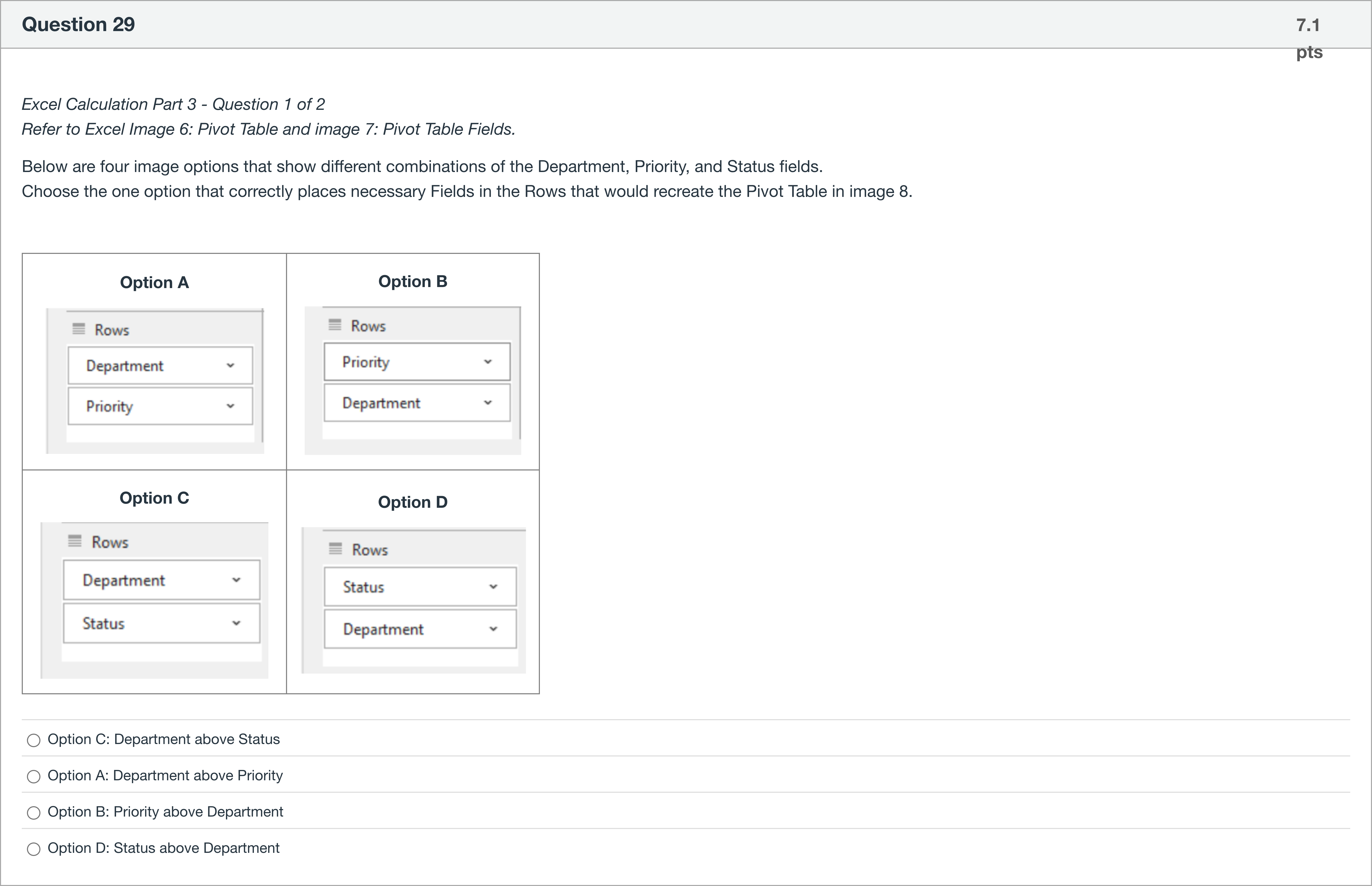
Excel Calculation Part 3 - Question 1 of 2 Refer to Excel Image 6: Pivot Table and image 7: Pivot Table Fields. Below are four image options that show different combinations of the Department, Priority, and Status fields. Choose the one option that correctly places necessary Fields in the Rows that would recreate the Pivot Table in image 8. Option A Option B Option C Option D
选项
A.Option C: Department above Status
B.Option A: Department above Priority
C.Option B: Priority above Department
D.Option D: Status above Department

查看解析
标准答案
Please login to view
思路分析
Question restatement: The task asks you to pick the image option that correctly places the necessary Fields in the Rows of a Pivot Table to recreate the given Pivot Table (image 8). The four options show different orders of Department, Priority, and Status in the Rows area.
Option A: Department above Priority. In this arrangement, Department is the top row field and Priority is the second row field. If the target Pivot Table requires Department to be above Status, this ordering would not match that intended structure, and any row-level grouping or drill-down dependent on Status would be misrepresented.
Opti......Login to view full explanation登录即可查看完整答案
我们收录了全球超50000道考试原题与详细解析,现在登录,立即获得答案。
类似问题
What does a pivot table primarily help with in data analysis?
In a pivot table showing satisfaction by gender, which is the most likely field in the 'Values' area?
Which component of the AMPS model would usually involve creating a pivottable?
Excel Calculation Part 3 - Question 2 of 2 Refer to the Excel image 6: Pivot Table above. Review the Pivot Table and first identify the Department that has the largest number of most High and Pending tickets --- this means the largest values from both the High AND Pending categories. How many of these High and Pending tickets does that Department have? Your answer should be a single number.
更多留学生实用工具
希望你的学习变得更简单
加入我们,立即解锁 海量真题 与 独家解析,让复习快人一步!