
Questions
Dashboard O1_2025 T1 Exam Excel and Word
Single choice
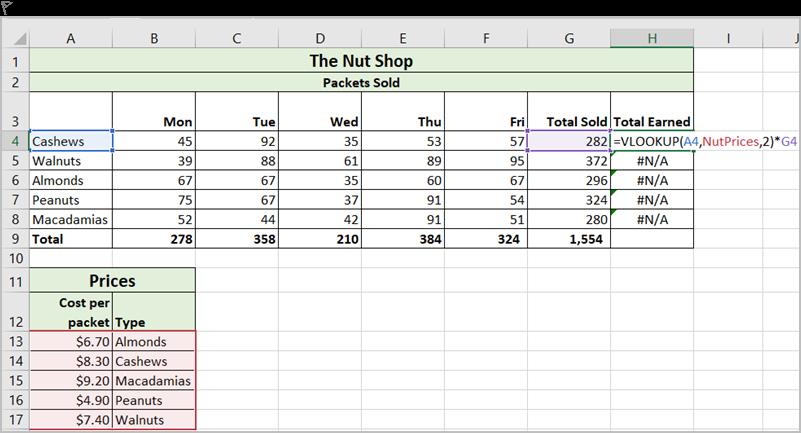
The spreadsheet below contains details of sales of packets of nuts for the week. The formula in column H is showing an error. What is the problem?
Options
A.a. The Type column in the Prices table should be the leftmost column.
B.b. Absolute references should have been used
C.c. The Prices table should be sorted in order
D.d. An Hlookup function should have been used

View Explanation
Verified Answer
Please login to view
Step-by-Step Analysis
To tackle this question, we first restate what is being asked and what each option proposes about the error in the H column formula.
Option a: The Type column in the Prices table should be the leftmost column. This is a plausible cause because VLOOKUP (which the formula appears to use) requires the lookup value to be in the first (leftmost) column of the table_array. If the Type column is not......Login to view full explanationLog in for full answers
We've collected over 50,000 authentic exam questions and detailed explanations from around the globe. Log in now and get instant access to the answers!
Similar Questions
True or false? VLOOKUP stands for Horizontal Lookup.
From the following four VLOOKUP formulas, select the ones that would produce the same output (i.e., result) when entered in a blank cell in the same worksheet.
Professor Grey is an instructor of COMM 499, an undergraduate course at the Faculty of Commerce at UFC that is open to all students regardless of their status. This means that even students with GRAD and UNCL status (in addition to those with UGRD status) are allowed to take the course. The grading system used for UNCL and UGRD students, however, is different from the grading system used for GRAD students. First, Professor Grey needs to complete column B of his class list (in an Excel spreadsheet) to assign each student to the correct four-letter Status. He wants to use a VLOOKUP function. Professor Grey intends to type up the formula in cell B2, and then drag the formula down to cell B15. The lookup table will be in F3:G5. Complete the lookup table F3:G5 below by entering appropriate values. Since F3:G5 is in an Excel worksheet, do not use double quotations when entering text in a cell. Do not leave any space or use $ sign. Also, do not use comma when entering a number.
The University of French Columbia provides a variety of housing options for the students. To improve the response time, UFC Student Housing Services decided to assign each student to a particular advisor based on the first letter of the student's last name. You would like to use VLOOKUP in column C that will use the lookup table in E2:G4 and write the contact number to column C based on the last name in column B. Note: Remember that UFC has over 5,000 students. The student list in the screenshot above is partial and only shows 10 students. Can you complete the lookup table so that each student will be assigned to the right advisor?
More Practical Tools for Students Powered by AI Study Helper
Making Your Study Simpler
Join us and instantly unlock extensive past papers & exclusive solutions to get a head start on your studies!