
Questions
MUF0051 ICT Unit 1 - Semester 2, 2025 1.22 Quiz: Spreadsheet software
Single choice
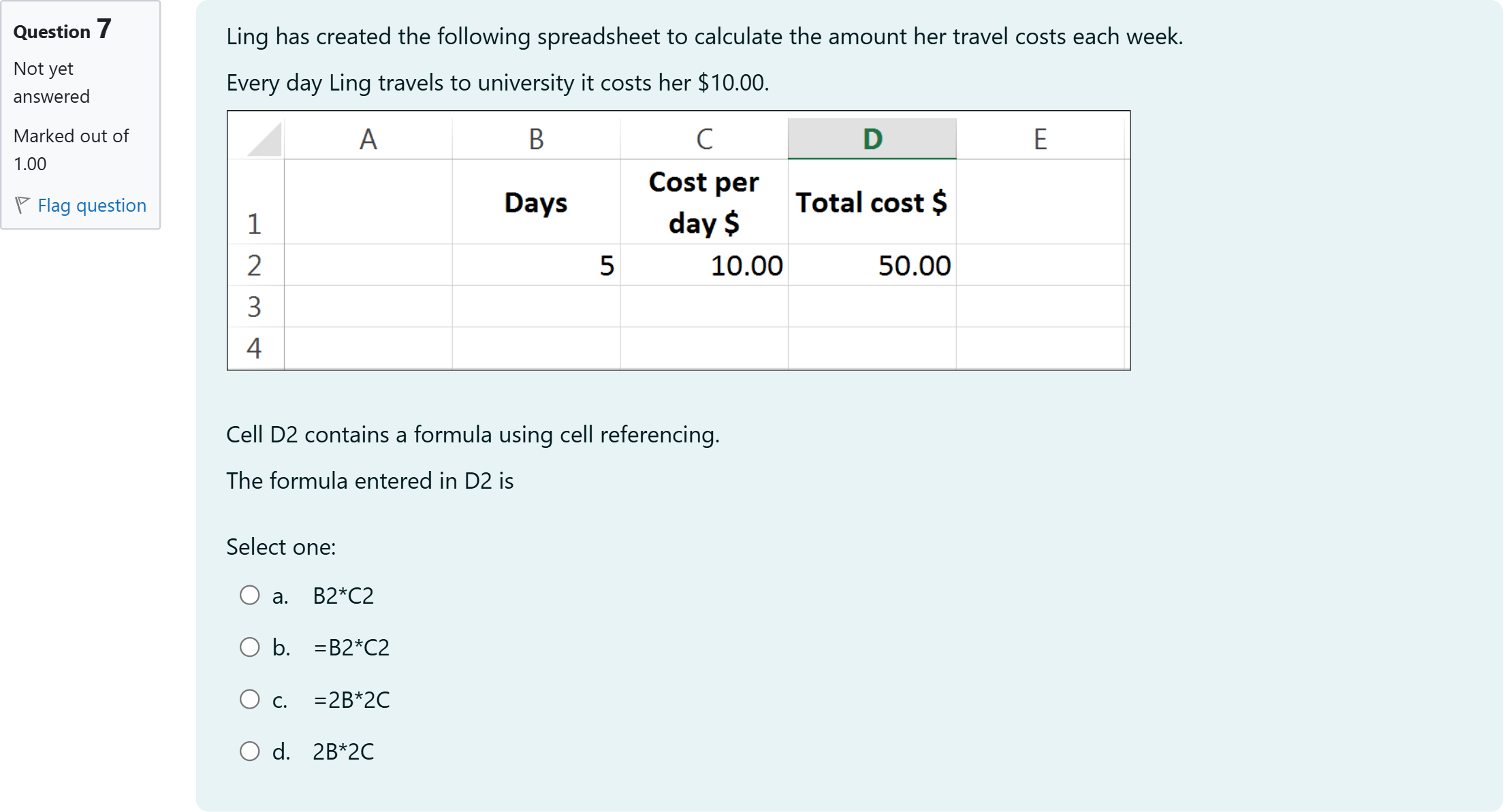
Ling has created the following spreadsheet to calculate the amount her travel costs each week. Every day Ling travels to university it costs her $10.00. Cell D2 contains a formula using cell referencing. The formula entered in D2 is
Options
A.a. B2*C2
B.b. =B2*C2
C.c. =2B*2C
D.d. 2B*2C

View Explanation
Verified Answer
Please login to view
Step-by-Step Analysis
First, let's restate the problem to ensure understanding: Ling's D2 cell should contain a formula that uses cell referencing to calculate total travel cost, with cost per day in C2 and number of days in B2.
Option a says B2*C2 — this lacks an equals sign, which is required in spreadsheet formulas; without =, the cell won't evaluate as a formula.
Option b shows =B2*C2 — this uses the equal......Login to view full explanationLog in for full answers
We've collected over 50,000 authentic exam questions and detailed explanations from around the globe. Log in now and get instant access to the answers!
Similar Questions
True or false? The Evaluate Formula command allows you to see the actual values and calculations that make up the complete formula.
Which sign does a linking formula begin with?
Supposed you typed the following formula in an empty cell and executed it successfully. =IF(FALSE,IF(FALSE,"a","b"),"c") Write the result that will be returned in that cell. [Fill in the blank]
There have been 4 different Xbox consoles in these 13 years: Xbox, XOne, X360, and Xlive. While you were looking into console names, you realize that there is no other console with a name that starts with character X. Also assume that there are consoles whose names start with character Y or character Z . Finally, assume that there is no console whose name is just Y or just Z (in other words, single letter Y or single letter Z). Complete the following formula to calculate the aggregate sales amount for all the games designed for any one of the Xbox consoles in Alex’s entire game dataset. =SUMIFS(I2:I1301,D2:D1301,">XXX") XXX SUMIFS(I2:I1301,D2:D1301,">XXX") You can only use either an arithmetic operator or a text in each blank and if you enter a text, each text should consist of a single letter. As always, don't leave any space in your formula. =SUMIFS(I2:I1301,D2:D1301,">[Fill in the blank], ")[Fill in the blank], SUMIFS(I2:I1301,D2:D1301,">[Fill in the blank], ")
More Practical Tools for Students Powered by AI Study Helper
Making Your Study Simpler
Join us and instantly unlock extensive past papers & exclusive solutions to get a head start on your studies!