
Questions
FNDN Computing for Business 2025 STD O1
Single choice
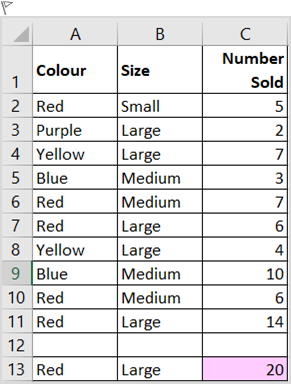
Jake has a list of tins of paint that have been sold in his store. There are several different colours of paint. The paint is sold in small, medium and large sized tins. What formula could you use in the shaded cell to show the number of large tins of red paint sold?
Options
A.a. =COUNTIF(C2:C11,A2:A11,A13,B2:B11,B13)
B.b. =COUNTIFS(C2:C11,A2:A11,A13,B2:B11,B13)
C.c. =SUMIFS(C2:C11,A2:A11,A13,B2:B11,B13)
D.d. =SUMIFS(B2:B11,A2:A11,A13,C2:C11,B13)

View Explanation
Verified Answer
Please login to view
Step-by-Step Analysis
Question and options restated:
- Question: Jake has a list of tins of paint sold, with colours (Column A) and sizes (Column B). The shaded cell should show the number (or amount) of large tins of red paint sold. Which formula could you use to achieve this?
- Answer choices:
a. =COUNTIF(C2:C11,A2:A11,A13,B2:B11,B13)
b. =COUNTIFS(C2:C11,A2:A11,A13,B2:B11,B13)
c. =SUMIFS(C2:C11,A2:A11,A13,B2:B11,B13)
d. =SUMIFS(B2:B11,A2:A11,A13,C2:C11,B13)
Option-by-option analysis:
Option a: =COUNTIF(C2:C11,A2:A11,A13,B2:B11,B13)
- What this attempts: It looks like an attempt to use a COUNTIF with multiple criteria, along with extra ranges. However, COUNTIF in Excel accepts only a single range and a single criterion. The syntax shown also mixes several ranges and criteria in a way that Excel would not interpret as valid. As a result, this would not correctly count red, large entries, nor would it return the sum of sold quantit......Login to view full explanationLog in for full answers
We've collected over 50,000 authentic exam questions and detailed explanations from around the globe. Log in now and get instant access to the answers!
Similar Questions
PlayStation 4, Xbox One, and Nintendo Switch are the major consoles of 2017. Among 100 game entries from the 2017’s top 100 chart, you want to find the number of games that are designed to work on consoles other than the popular three (i.e., PS4, XOne, and NS). =COUNTIFS(XXXXXXXX"=2017") =COUNTIFS( [ Select ] D2:D1301,"<>PS4&XOne&NS",A2:A1301, D2:D1301,OR("PS4","XOne","NS"),A2:A1301, D2:D1301,AND("PS4","XOne","NS"),A2:A1301, D2:D1301,"OR(PS4,XOne,NS) ",A2:A1301, D2:D1301,"OR(PS4,XOne,NS) ",A2:A1301, IF(D2:D1301<>AND("PS4","XOne","NS"),1,0), A2:A1301, IF(D2:D1301<>OR("PS4","XOne","NS"),1,0), A2:A1301, AND(D2:D1301,"<>PS4",D2:D1301,"<>XOne",D2:D1301,"<>NS"),A2:A1301, OR(D2:D1301,"<>PS4",D2:D1301,"<>XOne",D2:D1301,"<>NS"),A2:A1301, D2:D1301,"<>PS4",D2:D1301,"<>XOne",D2:D1301,"<>NS",A2:A1301, D2:D1301,"<>PS4&<>XOne&<>NS",A2:A1301, D2:D1301,"<>PS4"&"<>XOne"&"<>NS",A2:A1301, "=2017")
You are interested in determining the number of game titles (i.e., entries) that made it to the top 100 list for a specific console (as specified in cell V2) and during a particular year (as indicated in cell W2). Please complete the formula in X2 which would use the data in Alex's excel worksheet. Again, the formula should return the number of game entries which were designed for a given console (entered in V2) and made it to the top 100 list in a given year (entered in W2). =XXX(XXX,V2,XXX,XXX) In each blank, you can only use a function name, cell reference, or array reference. Don't leave any space in your formula. =[Fill in the blank], ([Fill in the blank], ,V2,[Fill in the blank], ,[Fill in the blank], )
Steven’s Hardware and Furniture Store is going out of business. He is looking to sell all the remaining items that he still has left. Steven has a way of organizing products in his store, using the letter A to indicate smaller products and B for larger-sized products. Each kind of products can be classified as either type A or type B. There is no other type. Tony owns a recycling company that processes smaller-sized items. He has contacted Steven looking to purchase Steven’s type-A products, but is only willing to purchase items with a high inventory status. He has set up the Excel table above to list different kinds of products, their types, inventory status, and inventory levels. Each row represents a different kind of products Steven has in his inventory. True or False: Tony can use the following formula to determine the number of different kinds of products he can purchase from Steven. =COUNTIFS(B2:B8,"<>B",C2:C8,"High")
Study the screen shot above. Aaron wishes to count all the refrigerated items that have now expired as of Today's date as shown in B1. Which of the formulas below would need to be entered into B11 to show this?
More Practical Tools for Students Powered by AI Study Helper
Making Your Study Simpler
Join us and instantly unlock extensive past papers & exclusive solutions to get a head start on your studies!